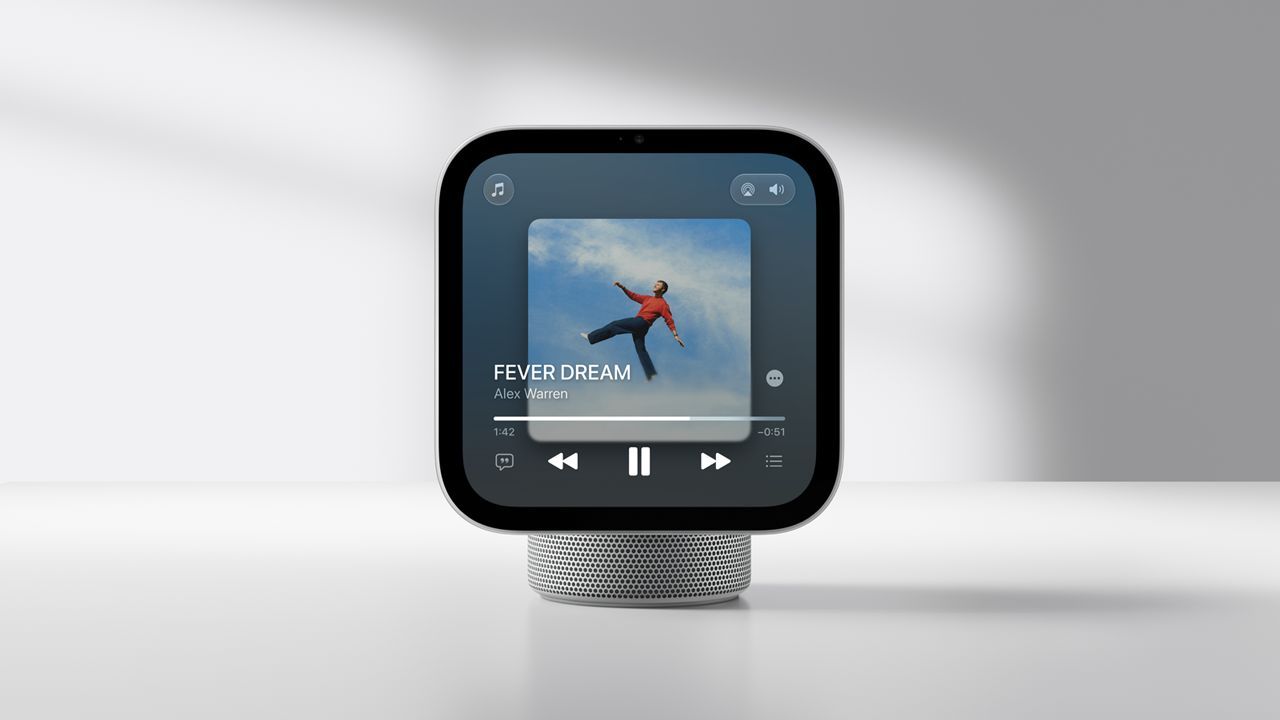
Some Apple HomeView owners have found exactly what they wanted: a kitchen screen for music, family calls, and checking who’s at the door. Others are still trying to get a timer to work.
But the Reddit discussions aren’t neatly split between fans and disappointed buyers. Some of the happiest owners still have a list of things they’d like Apple to fix.
Apple launched HomeView on November 13, putting music, FaceTime, and home management at the heart of its pitch. A few days in, early owners are getting to the question that matters: does another screen actually make life easier?
What the community thinks
These comments come from three r/HomeKit discussions, not a survey of all HomeView owners. We haven’t independently verified the accounts or reproduced the reported problems, but they offer a look at what people are enjoying and what’s getting on their nerves.
A place in the kitchen
(Image credit: Apple)
For some owners, the appeal is simple. They want to take a call, put on some music, follow a recipe, or check the front door without reaching for their phone. They don’t need another tablet full of apps.
A useful kitchen companion: “It’s what I wanted, which basically replaces my phone + HomePod in the kitchen.” – u/mirinjesse, describing calls, timers, recipes, music, and HomeKit controls.Keeping the phone free: “Kids in the kitchen can facetime with grandparents without taking my phone” – u/Internal-Pomelo757, who also lists recipes, visual timers, and music among their uses.A screen for the home: “For me is more doorbell cam and notifications, manage thermostats, smart lights, nursery cam, photo display….” – u/chente08.
All three comments come from a largely critical thread. Even the unhappy original poster says timers and calls work. That’s worth remembering: a screen you use for a few moments throughout the day doesn’t need to keep you entertained for hours to earn its place.
When the basics become frustrating
It’s harder to make that case when those little jobs don’t work. In another thread, one owner’s timer complaint gets replies from people who aren’t having the same trouble.
Frustration with a basic task: “The fact that I can’t set a timer with Siri is really annoying.” – u/snowace56.A different experience: “No doubt there’s bugs, but mine arrived yesterday and I have no such issues.” – u/MBSMD, responding in the same discussion.Connection trouble: “Idk mine can’t stay connected to my phone. Keeps saying same network required.” – u/bizzarefoods.
The timer thread’s original poster also says faces disappeared after a reboot, followed by Siri connection problems. Wanting more apps is one thing. Having to troubleshoot a timer is another. What these replies don’t tell us is why the same basic job works for one owner and not another.
How much should it need your iPhone
Then there’s the question of why you’re still reaching for your iPhone. Freeing up the phone is part of HomeView’s appeal for some commenters. Others want the two devices to get on with different jobs without getting in each other’s way.
Still reaching for the iPhone: “And why are so many of the widgets available to be placed onto the home screen only for them to say only available on iPhone when you try to use them?” – u/FewPipe816, who also praises music and recipe mode and says they are happy with HomeView.Two devices, different jobs: “I want to play music for my kids on it with Spotify then watch YouTube on my phone with my AirPods.” – u/GiggleyDuff, explaining their frustration with phone dependence.
That Spotify comment tells us what one owner wants to do, not what happens with every setup. Still, it’s a reasonable expectation to explore: can the household keep listening to music while the person whose phone is connected does something else?
Is potential enough?
(Image credit: Apple)
How much patience should a new purchase need? One detailed owner post praises live camera previews, music controls, and Handoff, but takes issue with rearranging widgets and adjusting the volume. They’re happy to keep it. Another commenter is ready to send theirs back.
Worth keeping, despite the friction: “All in all, I would buy again.” – u/idealdreams.Not willing to wait: “First time as a lifelong Apple user that I feel like a beta tester” – u/Extreme-Nerve3029, who says they intend to return theirs.Skepticism about future fixes: ““Potential” is worthless unless it’s free.” – u/JoelMDM, weighing in on the discussion rather than describing a specific fault.
You can like HomeView and still want Apple to sort out its software. But buying something you enjoy today is different from keeping it in the hope that an update will make it worth having. These owners don’t all draw that line in the same place.
Does this affect you?
There’s a difference between HomeView doing less than you’d hoped and struggling with the jobs you bought it for.
TechRadar’s Cat Ellis reports that HomeView doesn’t offer unrestricted App Store access. If you’re picturing an iPad on a stand, that’s something to know before buying. It’s not the same problem as asking for a timer and getting nowhere.
We still don’t know how common the reported reliability problems are. These threads can’t tell us that, or whether software versions, different setups, or fixes since the original posts explain some of the mixed experiences.
If you’re considering one, start with the jobs you’d actually give it. Calls with family? Music while you cook? A glance at the doorbell camera? Then ask how often you’d still need your phone and whether you’d be happy with what HomeView offers now, not what a future update might bring.
The happy owners and the frustrated ones are, in their own ways, asking the same thing: is this screen saving me effort, or giving me more to do?
Worth reading
Tom’s Guide: Mike Prospero’s hands-on review praises the hardware and audio but finds frustrating widget limitations and a Siri that trails rival assistants.TechRadar: A largely positive hands-on review, with caveats about limited third-party apps and some slow Siri responses.
